Never a false zero
If a check fails, the last reading stays on screen and is marked stale (with the reason) instead of pretending you have 0% used.

See your Claude Code limits before they stop you.
A tiny creature in the menu bar that fills up as you spend your 5-hour session and weekly allowance, with the exact percentage beside it.
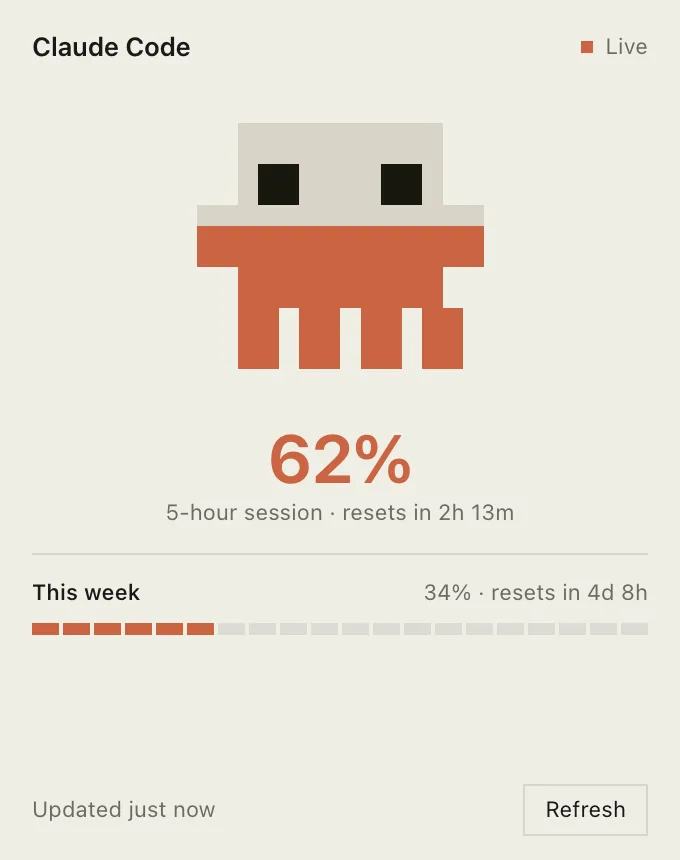
Claude Code runs on two clocks: a five-hour session window and a seven-day allowance. Both reset on their own schedule, and neither is in view while you're deep in a task.
So the usual way to find out you're near the limit is to hit it, mid-refactor, with the context loaded and momentum gone.
Glanceable first, exact second: the icon's fill tells you roughly where you are; the number beside it tells you precisely.

Reads the OAuth token Claude Code already keeps in the macOS Keychain. macOS asks once for permission. No login of its own.
One HTTPS request to the same usage endpoint Claude Code uses for its own usage display. The token is only ever the bearer for that call.
Every 60 seconds the icon, the percentage and the open panel refresh, with a countdown in between, so it never looks frozen.
The usage endpoint is undocumented and could change. The parser treats every field as optional and falls back to the last good reading when a response doesn't match.
If a check fails, the last reading stays on screen and is marked stale (with the reason) instead of pretending you have 0% used.
No account, analytics, telemetry or server of mine in the path. One request to Anthropic, nothing stored or forwarded.
Any app that asks for Keychain access should be inspectable, so the whole thing is public on GitHub.
Polling, parsing and the panel are all PHP, shipped with Laravel and NativePHP, proof the stack reaches the menu bar.
A port needs a different credential read, a platform tray icon and a build. Open an issue first so nobody duplicates the work.